

Best for: Medium to high-volume environments where speed, reliability, and capacity matter.


If you need a name badge printer that just gets the job done, day in and day out, the Zebra ZD411 is a solid investment. This direct thermal (DT) printer is designed to handle demanding workloads with ease. One of its standout features is the ability to hold up to 500 badges at a time, reducing the need for constant reloading and keeping productivity high.
Key Advantages:
- High capacity: Holds 500 badges, making it ideal for busy
registration desks, event check-ins, or large-scale staff ID issuance. - Fast, consistent output: No waiting for badges to print – great for environments where time is important, avoiding long lines for check-in.
- Compact footprint: Despite its capability, it doesn’t take up excessive space.
Why Choose It?
Choose the ZD411 if you need a durable, high-volume printer that can run all day without missing a beat. It’s perfect for organizations that prioritize efficiency and scale over extras like full-color or photo visitor ID badges.
Best for: Small offices, startups, or organizations with occasional printing needs
On the other end of the spectrum, IDPRT badge printers, like the SP310, offer a low-cost, entry-level solution for those who need basic functionality without breaking the bank. These printers are ideal for low to moderate volume environments and still provide dependable performance for everyday badge needs.

Key Advantages:
- Affordable price point: Great for budget-conscious buyers or those with simple ID needs.
- Compact and user-friendly: Easy to set up and operate, even for non-technical staff.
- Reliable enough for daily use: While not built for heavy loads, they handle regular tasks efficiently.
Why Choose It?
If you print a small number of badges per day – say for a small team, volunteer group, or infrequent event –then an IDPRT model could be all you need.
It’s adequate, reliable, and inexpensive, making it ideal for light-duty scenarios.
Best for: Organizations that prioritize design, brand identity, and clear photo identification
 When badge design and visual clarity are non-negotiable, the Epson C4000 delivers stunning full-color output that sets a new standard. This inkjet badge printer produces photo-quality images and allows for high-resolution logos, color-coding, and other visual enhancements that support both aesthetics and functionality
Key Advantages:
- Full-color, photo-quality output: Perfect for badges with visitor photos, detailed logos, or vibrant branding.
- Custom layout support: Easily create badges with color-coded departments, role indicators, or event access zones.
- Professional presentation: Impresses visitors, clients, and staff with polished, high-quality badges.
Why Choose It?
The Epson C4000 is your go-to if you’re looking to make a visual impact. Whether for security (clearer photo ID), marketing (branding through design), or aesthetics, this printer adds value far beyond just utility. It’s particularly useful for corporate environments, VIP badges, or public-facing roles.




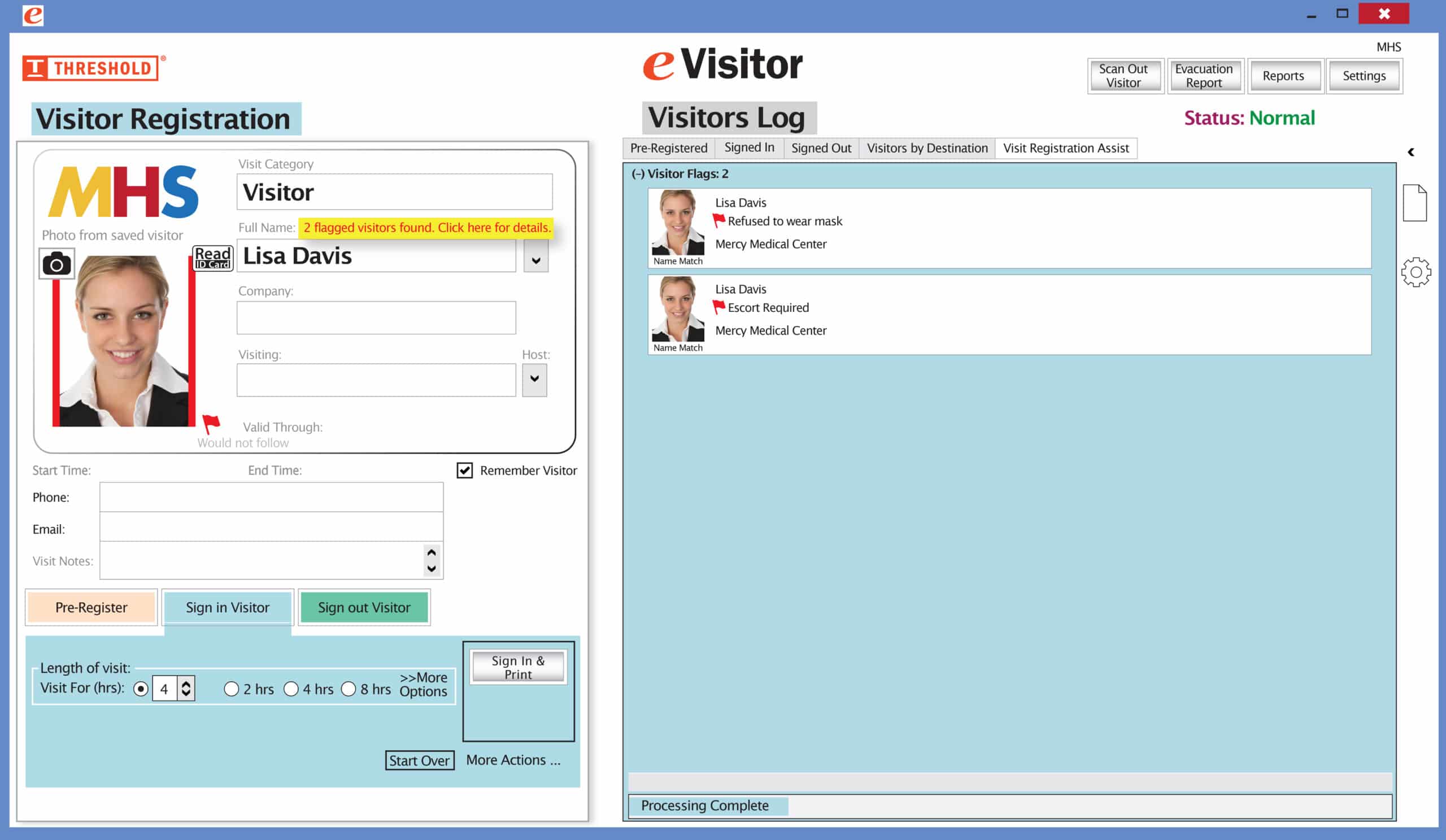 It’s easy and free to activate this feature. Simply call us and ask for “Red Flag, No Badge” to be turned on. Once it’s on, the above pop-up will come up when a red flagged visitor comes back. No badge will print and the attendant will need to follow the facility’s policy for handling red flagged visitors.