
THRESHOLD will be closed on Friday, April 3rd. We will reopen for business on Monday, April 6th.  

8 Tips to Improve the Security of Your Assisted Living Facility

Last updated: January 26, 2026
Visitor Security for Nursing Homes

Security is a critical function for  Assisted Living and Skilled Nursing facility operators. Residents are vulnerable to safety and privacy issues if facilities don’t manage the flow of people entering the building. Unauthorized visitors pose a threat of physical or emotional harm, theft, or abuse. As the operator of an Assisted Living or Skilled Nursing facility, it is your responsibility to protect your residents and staff. 

The challenge is balancing an open-door policy with safety and security needs. Many individuals need access to the campus buildings on any given day to conduct business or visit residents.  These may include contractors and vendors (think building maintenance workers, outside healthcare providers, or food/pharmacy delivery personnel), resident’s family members, friends, volunteers, and other visitors. 

Here are 8 tips to increase the security of your assisted living or skilled nursing facility:

  1.  Create a Visitor Policy that addresses the types of visitors who may access the buildings and grounds. Include plans that allow immediate family or other relatives  24-hour access to their loved one.
  1. Publish your policies on your website so that Visitors know the situation before they come to your facility.
  1. Implement a Visitor Management System (VMS). Your facility should take an active role in controlling access to your facility. A VMS collects accurate and reliable visitor details and sign-in history for every person entering your building or campus. A VMS allows you to keep a record of every visitor who has entered your facility. The VMS can be as simple as sign-in books or comprehensive as an enterprise electronic visitor registration system.
    Here are a few things to look for when purchasing a VMS:
    – The system prints a visitor badge that shows everyone that person has been processed through your sign-in system for extra security, consider using time-expiring visitor badges that change color overnight to prevent reuse. These badges VOID over time so you can easily see if someone has not signed in that day. Many systems can send visitation policies via email or text in advance of the arrival assuring visitors know what to expect.
    – It should include robust reporting features that provide visitor history and meet management needs for tracking, etc.
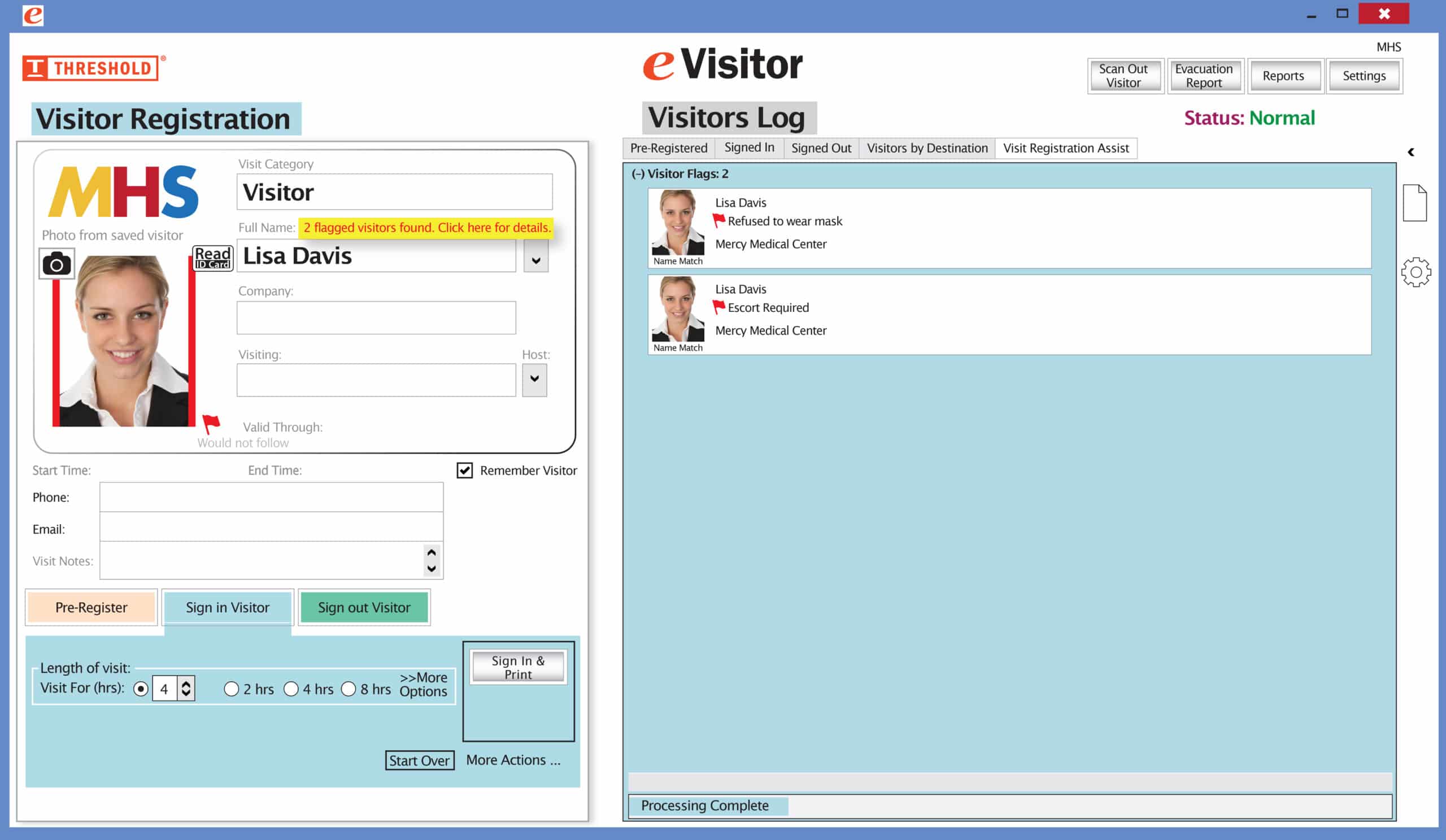
    – A visitor management system may also offer a “flag or alert” function. The resident, staff, security, and administration can flag a person based on prior behavior. Train your staff on how to respond when a flagged visitor returns.  The visitor management system can assist in organizational duties as well. For example, knowing how many visitors come and what peak arrival times are allows you to make strategic decisions for staffing. Analyzing Visitor traffic can also help you decide how to arrange your lobbies or common areas to better manage the flow of people.
  1. Establish Visiting Hours: specify hours during which visitors may access the building. These hours may vary depending on the purpose of the visit, i.e., vendor visits may be restricted to Monday through Friday 8:00AM to 3:00PM.  Explain how residents’ families can access the building after hours or when doors are locked.
  1. Develop policies and procedures to document and address any “visitor incident”. Train staff on these policies.
  1. Reduce theft by securing valuables out of sight.  Recommend that residents keep valuables in a secure place within their private space or lock their doors, if appropriate.
  1. Signage: Have signage clearly stating Visitor policies in a public area to make it easy for guests to read and comply. Use signage to indicate areas that are restricted or accessible to staff only. Areas that pose public safety hazards should be labeled and remain locked, such as areas of high voltage, HVAC, and generator rooms. Signs should be in multiple languages when appropriate for your population.
  1. Identify and secure areas of potential harm, such as HVAC systems, food prep, and supply storage areas, etc.

Call THRESHOLD at 800-243-1969 to learn how our Visitor Management Systems and Badges can help you increase security at your facility. 

Picture of Paul Kazlauskas

Paul Kazlauskas

Paul joined Threshold in 2001 after graduating from Bryant University. After a few years in the Sales Department, Paul transitioned to the Marketing Team in 2005. Over the years, Paul has worked on developing & launching new products, been the designer of customer communication emails, and launched numerous web sites for the Threshold product line. Since 2011, Paul Kazlauskas has been deeply involved in the security and visitor management industry, writing extensively about emerging technologies, market trends, and best practices that shape the field. In addition to his editorial experience, he actively represents his organization at major security trade shows and in-person events, where he connects with industry leaders, explores innovative solutions, and strengthens relationships with customers. His work reflects a hands-on understanding of both the business and technical sides of the industry, earned through years of direct engagement and thought leadership within the security community. A native of Connecticut, Paul enjoys outdoor activities like kayaking, golfing & hiking, as well as spending time with his son and coaching his soccer and baseball teams.
Picture of Paul Kazlauskas

Paul Kazlauskas

Paul joined Threshold in 2001 after graduating from Bryant University. After a few years in the Sales Department, Paul transitioned to the Marketing Team in 2005. Over the years, Paul has worked on developing & launching new products, been the designer of customer communication emails, and launched numerous web sites for the Threshold product line. Since 2011, Paul Kazlauskas has been deeply involved in the security and visitor management industry, writing extensively about emerging technologies, market trends, and best practices that shape the field. In addition to his editorial experience, he actively represents his organization at major security trade shows and in-person events, where he connects with industry leaders, explores innovative solutions, and strengthens relationships with customers. His work reflects a hands-on understanding of both the business and technical sides of the industry, earned through years of direct engagement and thought leadership within the security community. A native of Connecticut, Paul enjoys outdoor activities like kayaking, golfing & hiking, as well as spending time with his son and coaching his soccer and baseball teams.

Subscribe to THRESHOLD Updates

Sheryl Kantor

Financial Analyst

Sheryl joined Threshold in April 2025. She earned her Bachelor’s degree in Accounting from Central CT State University in 2001 and went on to build a career spanning more than 20 years in regulated private water utilities. While Threshold operates in a very different industry, Sheryl brings extensive financial expertise and a strong foundation in regulatory environments. In her role, she is responsible for all accounting functions at Threshold, including the preparation of monthly financial statements, corporate reporting, cost analysis and the development of annual budgets. She also oversees the finance department, ensuring accuracy, efficiency, and strategic financial management across the organization.

Sheryl enjoys spending quality time with her sons and her dog, Ozzy. She has a passion for cooking and baking, and loves attending country music concerts whenever she gets the chance. In her free time, she’s happiest outdoors – whether that’s hiking scenic trails or relaxing by a cozy fire.

Stacy Keefer

Production Manager

Stacy Keefer is a results-driven operations and production professional with over 25 years of experience improving workflows, managing production schedules, and supporting business growth. She is known for streamlining processes, coordinating with vendors, and delivering projects efficiently and on spec. Stacy brings a practical, hands-on approach to solving operational challenges and driving performance across teams.

When not working, she can be found fishing, hiking, or enjoying a round of disc golf.

Aris DiGiulio

Senior Product Manager

Aris DiGiulio joined Threshold as Senior Product Manager in 2024, bringing more than a decade of diverse experience in brand management, new product development, consulting and entrepreneurship. In this role, Aris leads the Product team in all innovation efforts while supervising management of the existing product portfolio. He also directs the support and development team for eVisitor, Threshold’s successful proprietary visitor management software used by organizations to streamline access management.

With prior experience at large global organizations including Diageo, Schick and Kobrand Corporation, Aris is focused on driving innovation while maintaining a high level of product quality and customer support that defines the Threshold organization. This has resulted in multiple new products and software enhancements that have delivered solutions and improved experiences for businesses, visitors, contractors and employees.

Aris earned his bachelor’s degree from Stony Brook University and an MBA from Fordham University’s Gabelli School of Business. He resides in Fairfield, Connecticut and enjoys spending time with his wife and two daughters.

Noel Turner

Director of Sales and Marketing

Noel Turner is a seasoned veteran in the visitor management marketplace. She is currently the Director of Sales and Marketing for Threshold Visitor Systems, an Avery Products Company. Her employment there spans twenty years, the last eight in her current position.

Her degree in communications and her industry experience have served her well in leadership roles with the ASIS and ISDA (Identification Security Dealers Association), leading national trade organizations in the security marketplace. She’s an industry expert in bringing together businesses, which collectively and efficiently solve the end user’s visitor security issues and problems with the appropriate level of sophistication, technology and cost.

In her free time, Noel loves to go camping and spend time with her dog.

Suzanne Corcoran

General Manager

Suzanne Corcoran joined Threshold in 2001 after a career in network radio sales and promotion. Starting in Sales, she quickly became part of a new Product Development team, using her marketing and project management skills to help create and launch the original Visitor Badge product line.

Over the years, she has added various management responsibilities from Production to Finance, leading to her current role as General Manager. Suzanne and the Threshold leadership team are dedicated to growth via new product development, enhanced web and digital marketing, high quality propriety products and superior service to customers and partners alike, all while fostering a collaborative and rewarding workplace culture.

10% off your first order of Parking Decals and Hang Tags

Parking Hang Tags and Decals

SIMPLE SOLUTIONS FOR PARKING IDENTIFICATION

A simple, reliable way to manage parking for staff,
residents, students, and visitors.

Use code PARK10 during checkout.

[searchwp_form id=2]

The Red Flag feature has been improved! Now you can set your system to not print a badge for any visitor record that has been previously marked with a Red Flag. The attendant will be prompted to redirect the visitor according to your security protocol.

Special New Feature: Red Flag, No Badge

Flag alertsIt’s easy and free to activate this feature. Simply call us and ask for “Red Flag, No Badge” to be turned on. Once it’s on, the above pop-up will come up when a red flagged visitor comes back. No badge will print and the attendant will need to follow the facility’s policy for handling red flagged visitors.

The flags and notes only show to the desk attendant, not the visitor. 

Please contact eVisitor Support with any questions on how to use Flags in your system. 

If you have seen a special offer in our advertising, mailings, or emails, this is the area to enter the Promo Code to receive that offer. After you’ve entered the Promo Code, click “Update cart” for the code to take effect. If you have any questions, please call 1-800-243-1969.