

Visitor management often gets treated as a front-desk formality, simply a clipboard, a sign-in sheet, a quick nod from the attendant. But it’s actually one of the most important safety and liability functions a facility has. A single weak point in how you handle visitors can open the door to real risk, from unauthorized building access to compliance violations and data breaches.
The good news: the most common visitor management mistakes are also the most fixable. Here are the ones we see most often, and what to do instead.
1. Still relying on a paper logbook
A sign-in sheet at the front desk might feel simple, but it’s not doing your facility any favors. According to Vizman’s article “Visitor Management System: The Complete 2026” (July 2026), “A paper log tells you who signed in, but nothing about whether that information is accurate, whether the visitor actually left when they said they would, or whether someone tailgated in behind an authorized guest without signing anything at all. When compliance auditors or investigators ask “who was in the building on a specific date,” flipping through months of illegible handwriting is not a real answer” (source: https://vizman.app/resources/blogs/visitor-management-system-the-complete-2026/).
A paper logbook is unprofessional-looking, easy to lose, and nearly impossible to search when you actually need a record of who was on-site on a given day. There’s no way to flag a problem visitor, no way to verify an ID was checked, and no way to pull a report if needed.
The fix: Move to a digital check-in system. Every entry becomes searchable, exportable, and tied to an actual identity rather than just a signature that may or may not be legible. There are many digital systems available that go from simple, stand-alone all the way to complex, enterprise systems that integrate.
2. No pre-registration option for employees
If staff have to email security or call the front desk every time they’re expecting a visitor, you’re creating friction that slows everyone down and increases the chance that a guest shows up unannounced and unverified.
The fix: Give employees a simple way to pre-register their visitors. When a guest arrives, front desk staff already have their name, purpose, and host on file, so check-in is quick and simple, instead of a bottleneck.
3. A slow, complicated check-in process
New visitor management software often makes it tempting to collect as much information as possible, including full contact details, multiple ID fields, and lengthy questionnaires. But every extra field is friction. A visitor who spends time entering data before a meeting will show up late, frustrated, or both, and it creates a backlog for everyone behind them in line.
The fix: Only collect what you actually need, That typically includes name, photo, host, date/time in/out, and destination or purpose of visit.
4. No watchlist or flagging system
Without a way to flag visitors, a facility has no record of incidents. Someone who was previously disruptive, uncooperative, or explicitly banned can walk right back in without anyone at the desk knowing their history.
The fix: Use a system that lets staff flag a visitor’s record. A color-coded system (red for alerts, yellow for special assistance, green for VIPs) with flags and notes visible only to staff, not the visitor is very typical. The best systems let flags be shared across multiple facilities so a concern at one location is accessible for other locations to see.
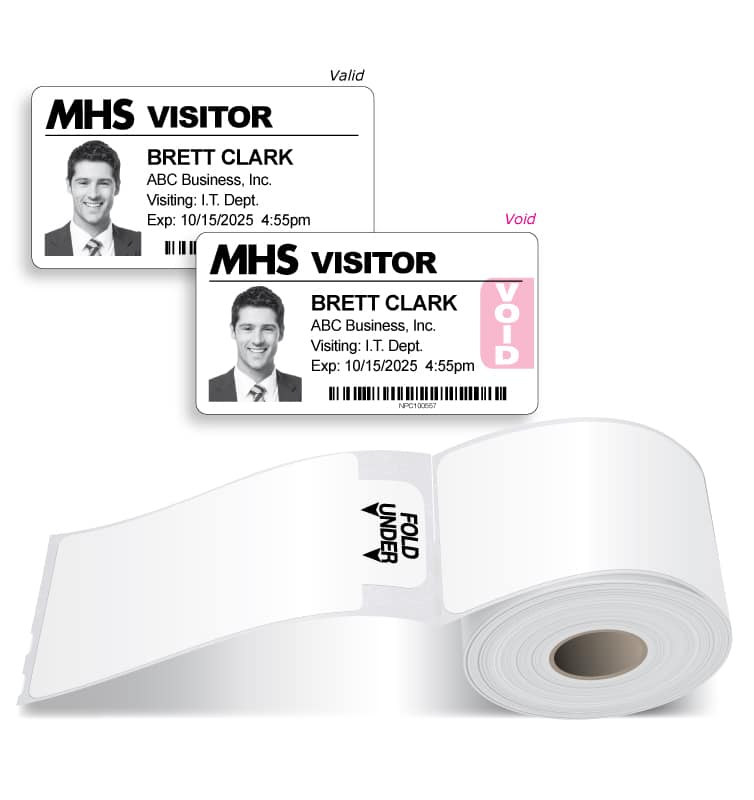
5. Badges that don’t visibly expire
A badge that looks the same on day 1 as it does on day 5 doesn’t give your staff a fast way to tell who’s still authorized to be in the building that day. If a badge can be reused indefinitely, is not functioning as a security control.
The fix: Use an expiring visitor badge, one that visibly changes color overnight and voids to signal it’s no longer valid. It gives staff an instant visual read on whether someone checked in that day, without having to get close to read the badge or check a log.
6. Failing to document every type of visitor
It’s easy to think of “visitors” as just scheduled guests, but contractors, vendors, delivery drivers, job candidates, and even parents picking up a student are all visitors too, and all of them should be logged in the same way.
According to Archie’s article “Workplace Visitor Policy: Template PDF, Examples & Tips” (June 8, 2026), “The term “Workplace Visitor” encompasses personal visitors such as friends and family, as well as contractors, external vendors, stakeholders and the public. This can include clients, vendors, contractors, delivery drivers, job candidates, employee guests, and remote employees visiting the office” (source: https://archieapp.co/blog/visitor-management-policy/).
The fix: Apply one consistent check-in policy to everyone that enters the building, regardless of why they’re there. A gap in one category is still a gap in your security.
7. Untrained front-desk staff
Even the best visitor management software is only as good as the person using it. Without proper training, a receptionist may skip ID checks during a busy stretch, mismanage a visitor log, or miss a red flag on a returning visitor entirely.
The fix: Train staff on the ‘why’, not just the ‘how’, but also what to check, when to escalate, and what a flagged record actually means. Software use training alone isn’t enough.
8. Ignoring data privacy and compliance
A strong Visitor Management system collects personal information, including names, photos, contact details, and driver’s license scans. If that data isn’t handled securely, it’s a liability. Organizations can be held responsible when visitor data is mishandled or breached.
The fix: Choose a system with real access controls, encryption, audit trails, and compliance features built-in, so visitor data is protected the same way any other sensitive record would be.

9. Too many unmonitored entrances
Facilities with multiple unstaffed entry points are inherently harder to secure than those that funnel all visitor traffic through one controlled entrance. Every extra door is another place where check-in can be skipped entirely.
The fix: Route visitors through a single, monitored entry point where every visitor can be processed through your system and get a badge to wear during their stay.
None of these mistakes are complicated to fix, but they can compound problems if they aren’t addressed. A facility with a paper logbook, no pre-registration, no flag alerts, and badges that don’t expire isn’t managing visitors, it’s just letting people in. The fix, in almost every case, comes down to the same thing: replace manual processes with a system that does the tracking, flagging, and reporting for you.
Threshold can help you get started. Call 800-243-1969 or use the form to contact us today for a software demo or visitor badge samples.
##Sources
Vizman. “Visitor Management System: The Complete 2026”. July 2026. https://vizman.app/resources/blogs/visitor-management-system-the-complete-2026/
Archie. “Workplace Visitor Policy: Template PDF, Examples & Tips”. June 8, 2026. https://archieapp.co/blog/visitor-management-policy/


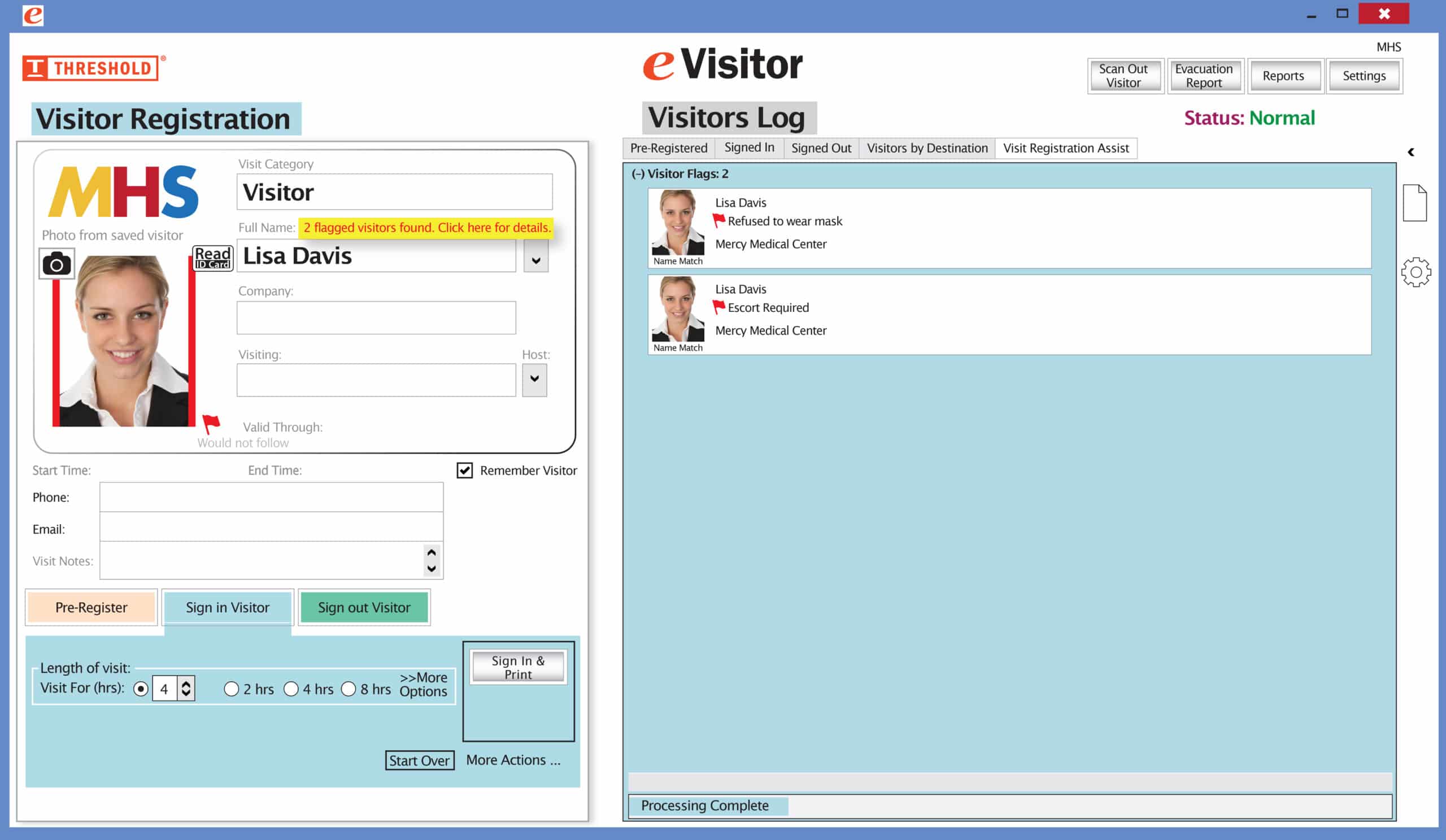 It’s easy and free to activate this feature. Simply call us and ask for “Red Flag, No Badge” to be turned on. Once it’s on, the above pop-up will come up when a red flagged visitor comes back. No badge will print and the attendant will need to follow the facility’s policy for handling red flagged visitors.