

Every day, schools are responsible for protecting the safety and well-being of every student. Today’s schools face the challenge of balancing a welcoming environment with the need for strong security measures. One important part of an overall security plan is an effective Visitor Management System (VMS).
A Visitor Management System is not just a sign-in tool — it’s an essential part of a school’s overall safety and security plan, helping staff know who is in the building, verify visitor identities, and ensure that every guest is on school campus for the right reasons.
1. Know Who’s in the Building
When visitors arrive, they sign in at the front office. The system records their name, time, and reason for visiting. In case of an emergency, the school has an accurate list of everyone on site. This data helps administrators and first responders act quickly and effectively.
2. Identify Visitor with a Visitor Badge
After signing in, visitors receive a badge to wear during their stay. The badge clearly displays the person’s name, photo (if applicable), and purpose of visit. Staff and students can easily recognize authorized visitors — and quickly spot anyone who hasn’t checked in. This step alone adds a visible layer of protection that reinforces a school’s commitment to safety.
3. Protecting Students
Many systems can scan a driver’s license and, if enabled by the district, check it against databases such as the national sex offender registry. This feature helps prevent unauthorized or unsafe individuals from entering the school.
4. Managing Guardianship and Pickups
Visitor Management Systems also help ensure that only approved parents or guardians can sign out a student. By verifying who is authorized to pick up each child, schools can keep dismissal times orderly and secure.
5. Building a Culture of Safety
Security isn’t just about technology — it’s about culture. When everyone follows the same procedures, such as signing in and wearing a visitor badge, it sends a clear message: “Safety matters here.” This consistency helps create a welcoming yet protected environment where students, staff, and families all feel confident and safe.
6. Helping Parents Understand the Process
Sometimes parents may wonder why these steps are necessary or feel the process is inconvenient —especially if they are familiar faces in the school community. Clear communication helps build understanding and support.
To help schools explain the “why” behind visitor procedures, we’ve created a short, easy-to-understand handout that can be shared with families. This resource describes how visitor sign-in and badge policies protect students, staff, and visitors alike, and reinforces that these steps are about safety, not inconvenience.
When families understand the purpose behind visitor management, they are more likely to support and follow the process—helping schools maintain a safer environment for everyone.
Summary:
An effective Visitor Management System helps schools stay prepared, organized, and secure—without sacrificing a welcoming atmosphere. From knowing who is in the building to reinforcing a culture of safety, visitor management plays a critical role in protecting today’s schools.
Whether you’re looking for a simple badge system or a more comprehensive visitor management solution, our team is here to help you find the right fit for your school or district.
Contact THRESHOLD to learn how our products can help protect your school and support a safer learning environment for everyone.


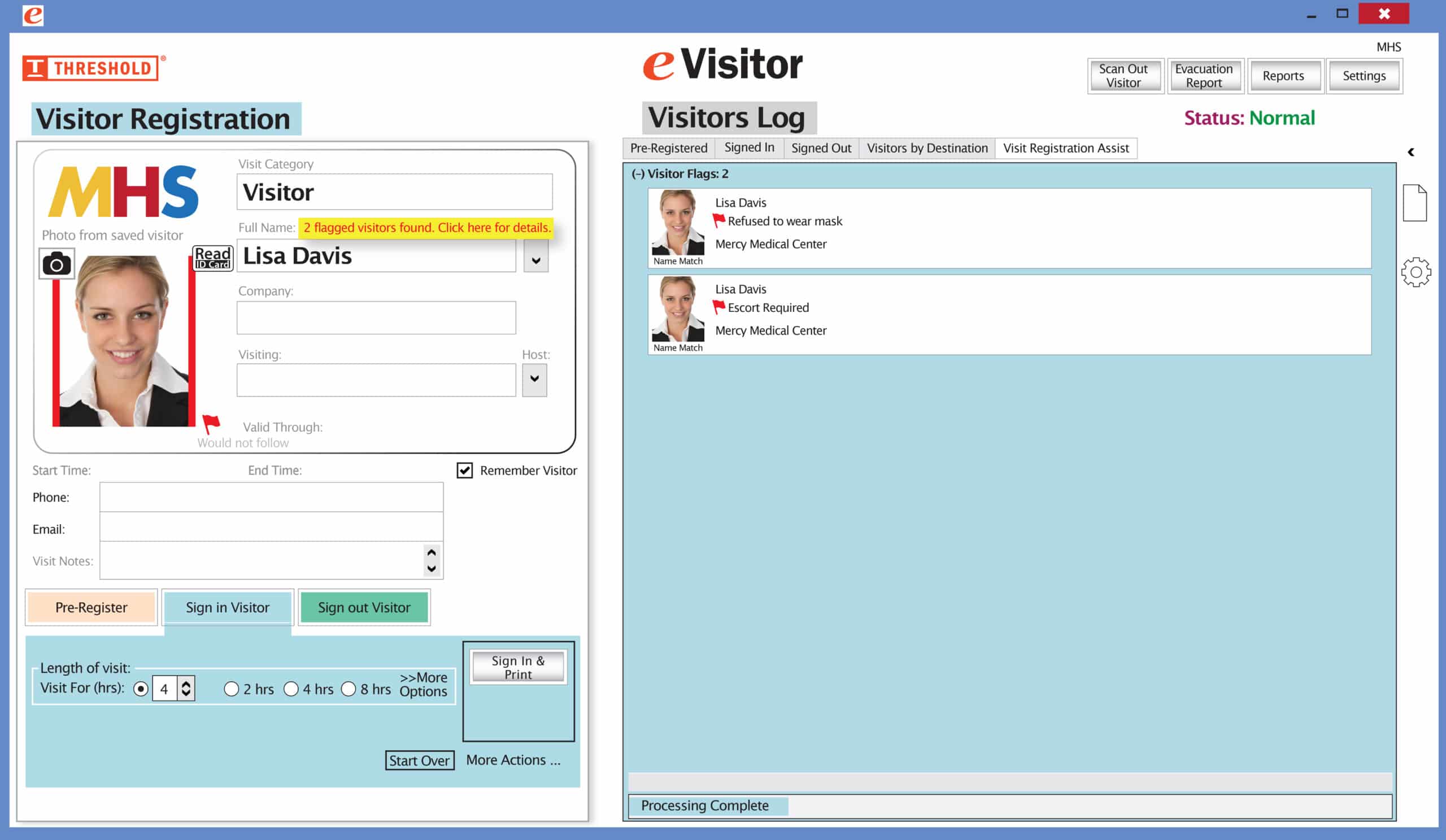 It’s easy and free to activate this feature. Simply call us and ask for “Red Flag, No Badge” to be turned on. Once it’s on, the above pop-up will come up when a red flagged visitor comes back. No badge will print and the attendant will need to follow the facility’s policy for handling red flagged visitors.