
See our client-friendly emails, ready for you to send
Choose an email to download and review. Use the content in the Word documents below to create your own emails.
- Subject Line – Do your vendors check in every time they visit? How do you know?
Product Featured: TAB-Expiring Visitor Badges - Subject Line – Expiring Visitor Badges make life easier for your staff
Product Featured: TAB-Expiring Visitor Badges - Subject Line – How do you protect your staff from outsiders?
Product Featured: TAB-Expiring Visitor Badges - Subject Line – New video shows why Expiring Badges add to your facility security
Product Featured: Expiring Visitor Badges - Subject Line – Our expiring badges work with popular printers and visitor management software systems
Products Featured: TAB-Expiring Visitor Badges; all the Software and Printers our badges are compatibile with - Subject Line – Six reasons you should be using visitor badges with expiring technology
Product Featured: TAB-Expiring Visitor Badges - Subject Line – Unauthorized visitors can’t hide behind an expired badge
Product Featured: TAB-Expiring Visitor Badges - Subject Line – Why organizations issue visitor badges that expire
Product Featured: TAB-Expiring Visitor Badges - Subject Line – Expiring Visitor and Guest Stickers affordably help increase your building security
Products Featured: 2″ x 1″ Expiring Visitor and Guest Stickers - Subject Line – Expiring visitor badges are valid today, void tomorrow
Product Featured: TAB-Expiring Visitor Badges - Subject Line – Security you can SEE is built into our visitor badges
Product Featured: TAB-Expiring Visitor Badges - Subject Line – An easy upgrade to your visitor sign-in process
Products Featured: TAB-Expiring Visitor Badges; all the Software and Printers our badges are compatible with - Subject Line – 3 reasons security pros prefer our visitor badges
Products Featured: Expiring and Standard Badges on Rolls
- Subject Line – 2 ways to collect information for contact tracing (eVisitor)
Products Featured: eVisitor, Screened Stickers - Subject Line – 3 new software features manage your visitor capacity (eVisitor)
Product Featured: eVisitor - Subject Line – 4 best practices for you to manage visitors today
Product Featured: eVisitor Software
- Subject Line – Direct Thermal Visitor Badges now in color!
Product Featured: Color Direct Thermal Badges - Subject Line – Visitor I.D.s that your employees can really see
Product Featured: Multi-Colored Badge Tags - Subject Line – Increase visitor security with the use of color – Print IN Color, Print or Write ON Color, or Stick TO Color
Products Featured: Tandem-Expiring Visitor Badges, Color Direct Thermal Badges, Color Badge Tags
- Subject Line – Alternative printers to DYMO’s restrictive 550 printers
Products Featured: printer links for Zebra, Brother, and Seiko - Subject Line – Do you clients’ visitor photo badges look like this? If so, we can help
Products Featured: Standard and TAB-Expiring Direct Thermal Badges

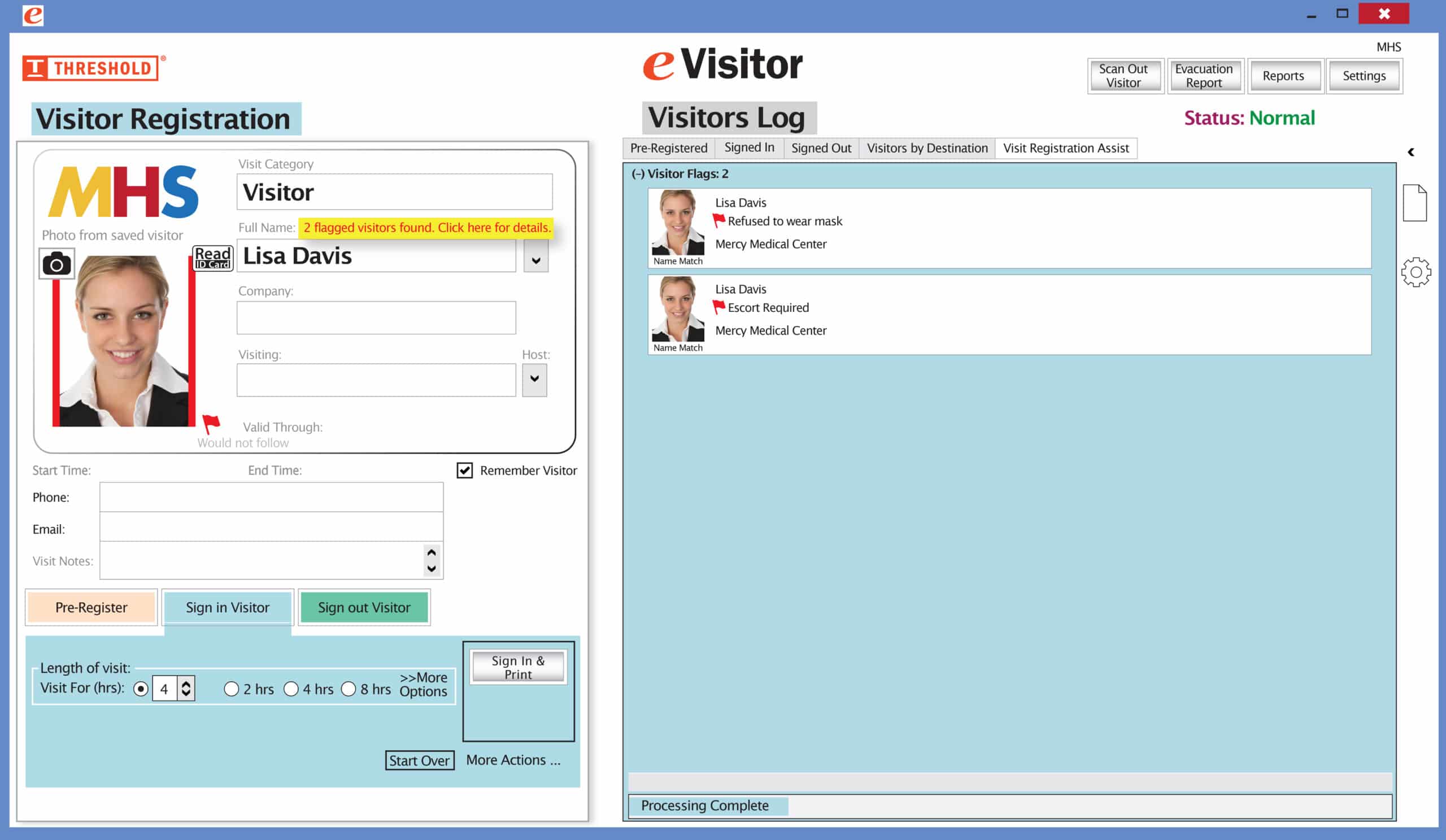 It’s easy and free to activate this feature. Simply call us and ask for “Red Flag, No Badge” to be turned on. Once it’s on, the above pop-up will come up when a red flagged visitor comes back. No badge will print and the attendant will need to follow the facility’s policy for handling red flagged visitors.